
Start with the color encoding of your footage. Set the correct source space, then choose how CreativeTrack displays the shot, prepares tracking images and converts delivery media.
Set the source and viewer color
| Control | Default | What it does |
|---|---|---|
| OCIO Config | Bundled Studio configuration | Select a Studio-config URI or OCIO file containing the source and destination spaces you need. |
| Color Space Transform | Off | Apply the configured transforms. Enable it for camera/log footage that needs conversion. |
| Tracking / Viewer Color: Source Input | sRGB Encoded Rec.709 (sRGB) | Identify the source encoding for preview and tracking preparation. |
| Viewer / Tracking Output | sRGB Encoded Rec.709 (sRGB) | Choose the transformed viewer and tracking-image output. |
For footage already prepared in Rec.709, leave Color Space Transform off unless you need a transform. For log footage, enable it, choose the matching source encoding and check the preview before tracking.
The initial configuration is ocio://studio-config-v4.0.0_aces-v2.0_ocio-v2.5. Custom configurations must include your selected spaces. If a space is missing, check the configuration and the exact name in the error.
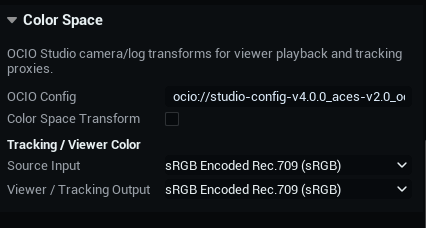
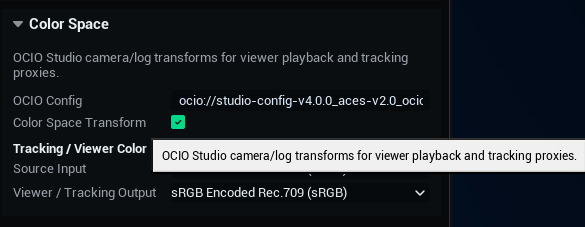
Set viewer and delivery inputs separately
Color Space → Source Input describes the material used for viewing and tracking. Media & Delivery → Conversion Color → Source Input describes the material used for delivery conversion. Set each to match the source that stage reads.
You can view the shot in a display-oriented space while exporting scene-linear media for compositing. The two outputs do not need to match.
Viewer and tracking output spaces
- sRGB Encoded Rec.709 (sRGB)
- Camera Rec.709
- Rec.1886 Rec.709 – Display
- Gamma 2.2 Rec.709 – Display
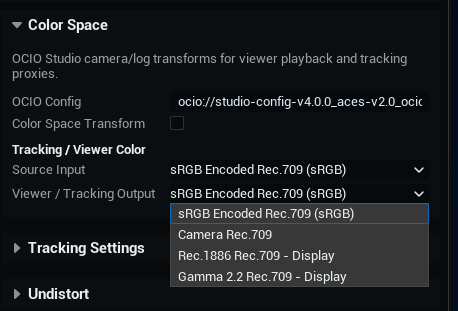
Match the source encoding
Both Source Input menus use the labels below. Match the actual log curve and gamut used to create the footage, not just the camera brand.
| Type | Available labels |
|---|---|
| Display / Rec.709 | Camera Rec.709; sRGB Encoded Rec.709 (sRGB); Rec.1886 Rec.709 – Display; Gamma 2.2 Rec.709 – Display |
| Camera and grading encodings | BMDFilm WideGamut Gen5; Linear BMD WideGamut Gen5; DaVinci Intermediate WideGamut; S-Log3 S-Gamut3.Cine; S-Log3 S-Gamut3; S-Log3 Venice S-Gamut3.Cine; ARRI LogC3 (EI800); ARRI LogC4; CanonLog2 CinemaGamut D55; CanonLog3 CinemaGamut D55; Log3G10 REDWideGamutRGB; V-Log V-Gamut; D-Log D-Gamut; Apple Log |
| Scene-linear interchange | ACES2065-1; ACEScg |
Choose Input is a placeholder, not a color space. Select the real source encoding before applying a transform.
Choose the delivery color space
Output Color in Media & Delivery defaults to ACEScg. You can also choose Source Color (No Transform), Linear Rec.709 (sRGB), ACES2065-1, sRGB Encoded Rec.709 (sRGB) or Camera Rec.709.
To transform converted media, Color Space Transform must be on and Output Color must specify a transformed destination. Selecting ACEScg alone does not enable conversion. Choose Source Color (No Transform) to keep the source encoding.
Keeping the color encoding does not make every format conversion lossless. Set the format and resolution for your delivery in media preparation and conversion.
